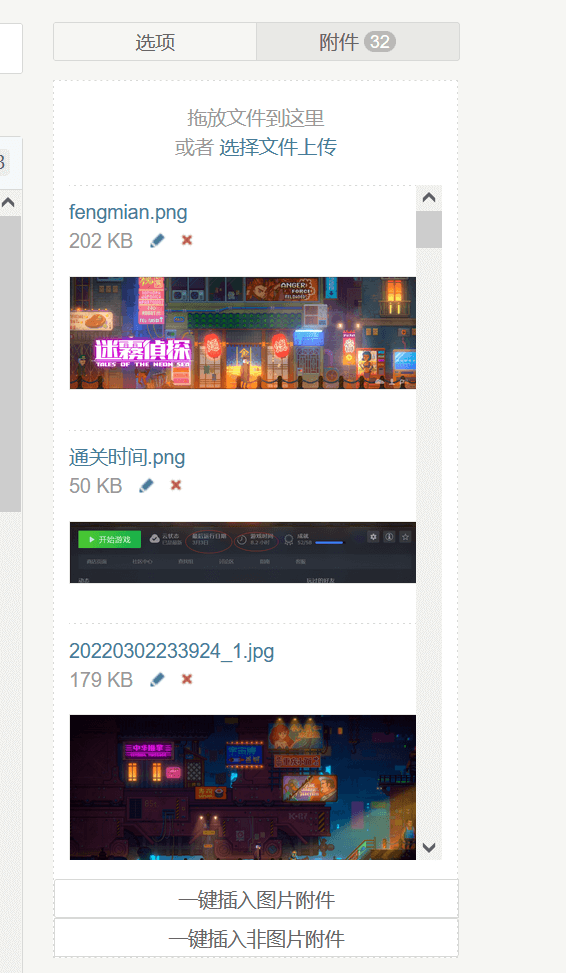
🙃不得不说,你在享受typecho简洁的同时,你也要承受他的简洁带来的不便.最近..也不是最近,近几个月吧,发了几个图片的文章之后就发现插入图片的时候没个预览是真的不方便,谁记得哪个文件名是哪个图片..
以下改动仅限于TypeCho1.2版本,1.1没测试过…
4个小时以后我又回来了,好像有点太简陋了,有了另外一版.把图片移动到右边,然后增加了一个直接粘贴图片的功能.如图:
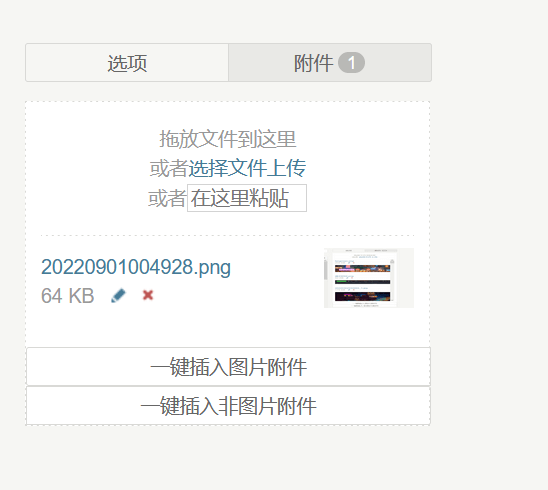
整个打包上来吧,这直接覆盖到admin目录即可
点我下载附件可视化
或者你可以自己手动复制粘贴代码修改admin目录的如下两个文件.
file-upload.php
<?php if(!defined(’__TYPECHO_ADMIN__’)) exit; ?>
<?php
if (isset($post) || isset($page)) {
    $cid = isset($post) ? $post->cid : $page->cid;
    if ($cid) {
        \Widget\Contents\Attachment\Related::alloc([’parentId’ => $cid])->to($attachment);
    } else {
        \Widget\Contents\Attachment\Unattached::alloc()->to($attachment);
    }
}
?>
<div id=”upload-panel” class=”p”>

    <div class=”upload-area” draggable=”true”>
        拖放文件到这里
        或者<a href=”###” class=”upload-file”>选择文件上传</a>
        或者<input placeholder=”在这里粘贴” name=”pasteInput” id=”pasteInput” class=”pasteInput”>
    </div>
    <ul id=”file-list”>
    <?php while ($attachment->next()): ?>
        <li class=”files-item” data-cid=”<?php $attachment->cid(); ?>” data-url=”<?php echo $attachment->attachment->url; ?>” data-image=”<?php echo $attachment->attachment->isImage ? 1 : 0; ?>”><input type=”hidden” name=”attachment[]” value=”<?php $attachment->cid(); ?>” />
            <div class=”left”>
                <a class=”insert” title=”<?php _e(’点击插入文件’); ?>” href=”###”><?php $attachment->title(); ?></a>
                <div class=”info”>
                    <?php echo number_format(ceil($attachment->attachment->size / 1024)); ?> Kb
                    <a class=”file” target=”_blank” href=”<?php $options->adminUrl(’media.php?cid=’ . $attachment->cid); ?>” title=”<?php _e(’编辑’); ?>”><i class=”i-edit”></i></a>
                    <a href=”###” class=”delete” title=”<?php _e(’删除’); ?>”><i class=”i-delete”></i></a>
                </div>
            </div>
            <?php if ($attachment->attachment->isImage): ?>
            <div class=”right”>
                <img src=”<?php echo $attachment->attachment->url; ?>”>
            </div>
            <?php endif; ?>
        </li>
    <?php endwhile; ?>
    </ul>
</div>
<style>
    .files-item{
        display: flex;
        align-items: center;
        justify-content: space-between;
    }
    .files-item .right img{
        width: 60px;
        height: 40px;
    }
    .pasteInput{
        width: 75px;
        border: 1px solid lightgray
    }
</style>
file-upload-js.php
<?php if(!defined(’__TYPECHO_ADMIN__’)) exit; ?>
<?php
if (isset($post) && $post instanceof \Typecho\Widget && $post->have()) {
    $fileParentContent = $post;
} elseif (isset($page) && $page instanceof \Typecho\Widget && $page->have()) {
    $fileParentContent = $page;
}
$phpMaxFilesize = function_exists(’ini_get’) ? trim(ini_get(’upload_max_filesize’)) : 0;
if (preg_match(”/^([0-9]+)([a-z]{1,2})$/i”, $phpMaxFilesize, $matches)) {
    $phpMaxFilesize = strtolower($matches[1] . $matches[2] . (1 == strlen($matches[2]) ? ’b' : '’));
}
?>
<script src=”<?php $options->adminStaticUrl(’js’, ’moxie.js’); ?>”></script>
<script src=”<?php $options->adminStaticUrl(’js’, ’plupload.js’); ?>”></script>
<script>
$(document).ready(function() {
    function updateAttacmentNumber () {
        var btn = $(’#tab-files-btn’),
            balloon = $(’.balloon’, btn),
            count = $(’#file-list li .insert’).length;
        if (count > 0) {
            if (!balloon.length) {
                btn.html($.trim(btn.html()) + ’ ’);
                balloon = $(’<span class=”balloon”></span>’).appendTo(btn);
            }
            balloon.html(count);
        } else if (0 == count && balloon.length > 0) {
            balloon.remove();
        }
    }
    $(’#pasteInput’).bind({
        ’paste’: function(e){
            console.log(’file paste’);
            var clipboardData = e.originalEvent.clipboardData;
            if(clipboardData && clipboardData.files && clipboardData.files.length > 0){
                for(let i = 0; i < clipboardData.files.length; i++){
                    let f = clipboardData.files[i];
                    try{
                        uploader.addFile(f, f.name);
                    }catch(e){
                    }
                }
                setTimeout(() => {
                    $(e.target).val('’);
                });
            }
        }
    })
    $(’.upload-area’).bind({
        dragenter   :   function () {
            $(this).parent().addClass(’drag’);
        },
        dragover    :   function (e) {
            $(this).parent().addClass(’drag’);
        },
        drop        :   function () {
            $(this).parent().removeClass(’drag’);
        },

        dragend     :   function () {
            $(this).parent().removeClass(’drag’);
        },
        dragleave   :   function () {
            $(this).parent().removeClass(’drag’);
        }
    });
    updateAttacmentNumber();
    function fileUploadStart (file) {
        $(’<li id=”‘ + file.id + ’” class=”loading”>’
            + file.name + ’</li>’).appendTo(’#file-list’);
    }
    function fileUploadError (error) {
        var file = error.file, code = error.code, word;

        switch (code) {
            case plupload.FILE_SIZE_ERROR:
                word = ’<?php _e(’文件大小超过限制’); ?>’;
                break;
            case plupload.FILE_EXTENSION_ERROR:
                word = ’<?php _e(’文件扩展名不被支持’); ?>’;
                break;
            case plupload.FILE_DUPLICATE_ERROR:
                word = ’<?php _e(’文件已经上传过’); ?>’;
                break;
            case plupload.HTTP_ERROR:
            default:
                word = ’<?php _e(’上传出现错误’); ?>’;
                break;
        }
        var fileError = ’<?php _e(’%s 上传失败’); ?>’.replace(’%s’, file.name),
            li, exist = $(’#' + file.id);
        if (exist.length > 0) {
            li = exist.removeClass(’loading’).html(fileError);
        } else {
            li = $(’<li>’ + fileError + ’
‘ + word + ’</li>’).appendTo(’#file-list’);
        }
        li.effect(’highlight’, {color : ’#FBC2C4′}, 2000, function () {
            $(this).remove();
        });
        // fix issue #341
        this.removeFile(file);
    }
    var completeFile = null;
    function fileUploadComplete (id, url, data) {
        var li = $(’#' + id).removeClass(’loading’).addClass(’files-item’).data(’cid’, data.cid)
            .data(’url’, data.url)
            .data(’image’, data.isImage)
            .html(’<div class=”left”><input type=”hidden” name=”attachment[]” value=”‘ + data.cid + ’” />’
                + ’<a class=”insert” target=”_blank” href=”###” title=”<?php _e(’点击插入文件’); ?>”>’ + data.title + ’</a><div class=”info”>’ + data.bytes
                + ’ <a class=”file” target=”_blank” href=”<?php $options->adminUrl(’media.php’); ?>?cid=’
                + data.cid + ’” title=”<?php _e(’编辑’); ?>”><i class=”i-edit”></i></a>’
                + ’ <a class=”delete” href=”###” title=”<?php _e(’删除’); ?>”><i class=”i-delete”></i></a></div>’
                + ’</div>’ + (data.isImage ? (’<div class=”right”><img src=”‘ + data.url + ’”></div>’) : '’))
            .effect(’highlight’, 1000);

        attachInsertEvent(li);
        attachDeleteEvent(li);
        updateAttacmentNumber();
        if (!completeFile) {
            completeFile = data;
        }
    }
    var uploader = null, tabFilesEl = $(’#tab-files’).bind(’init’, function () {
        uploader = new plupload.Uploader({
            browse_button   :   $(’.upload-file’).get(0),
            url             :   ’<?php $security->index(’/action/upload’
                . (isset($fileParentContent) ? ’?cid=’ . $fileParentContent->cid : '’)); ?>’,
            runtimes        :   ’html5,flash,html4′,
            flash_swf_url   :   ’<?php $options->adminStaticUrl(’js’, ’Moxie.swf’); ?>’,
            drop_element    :   $(’.upload-area’).get(0),
            filters         :   {
                max_file_size       :   ’<?php echo $phpMaxFilesize ?>’,
                mime_types          :   [{’title’ : ’<?php _e(’允许上传的文件’); ?>’, ’extensions’ : ’<?php echo implode(’,', $options->allowedAttachmentTypes); ?>’}],
                prevent_duplicates  :   true
            },
            init            :   {
                FilesAdded      :   function (up, files) {
                    for (var i = 0; i < files.length; i ++) {
                        fileUploadStart(files[i]);
                    }
                    completeFile = null;
                    uploader.start();
                },
                UploadComplete  :   function () {
                    if (completeFile) {
                        Typecho.uploadComplete(completeFile);
                    }
                },
                FileUploaded    :   function (up, file, result) {
                    if (200 == result.status) {
                        var data = $.parseJSON(result.response);
                        if (data) {
                            fileUploadComplete(file.id, data[0], data[1]);
                            uploader.removeFile(file);
                            return;
                        }
                    }
                    fileUploadError.call(uploader, {
                        code : plupload.HTTP_ERROR,
                        file : file
                    });
                },
                Error           :   function (up, error) {
                    fileUploadError.call(uploader, error);
                }
            }
        });
        uploader.init();
    });
    Typecho.uploadFile = function (file, name) {
        if (!uploader) {
            $(’#tab-files-btn’).parent().trigger(’click’);
        }

        var timer = setInterval(function () {
            if (!uploader) {
                return;
            }
            clearInterval(timer);
            timer = null;
            uploader.addFile(file, name);
        }, 50);
    };
    function attachInsertEvent (el) {
        $(’.insert’, el).click(function () {
            var t = $(this), p = t.parents(’li’);
            Typecho.insertFileToEditor(t.text(), p.data(’url’), p.data(’image’));
            return false;
        });
    }
    function attachDeleteEvent (el) {
        var file = $(’a.insert’, el).text();
        $(’.delete’, el).click(function () {
            if (confirm(’<?php _e(’确认要删除文件 %s 吗?’); ?>’.replace(’%s’, file))) {
                var cid = $(this).parents(’li’).data(’cid’);
                $.post(’<?php $security->index(’/action/contents-attachment-edit’); ?>’,
                    {’do’ : ’delete’, ’cid’ : cid},
                    function () {
                        $(el).fadeOut(function () {
                            $(this).remove();
                            updateAttacmentNumber();
                        });
                    });
            }
            return false;
        });
    }
    $(’#file-list li’).each(function () {
        attachInsertEvent(this);
        attachDeleteEvent(this);
    });
});
</script>
以下内容为几个小时以前的内容,两个都可行,只不过上面那个增加了粘贴剪贴板图片的功能.
打开admin/file-upload.php在第25行的
评论
大佬有没有联系方式呀 加个好友 我的QQ782268618 大佬看到能不能加个好友哈哈
😂加你了,不过我QQ用的蛮少